Item Tooltip
Hover any item to see its stats, protections, and description
What Is the Item Tooltip?
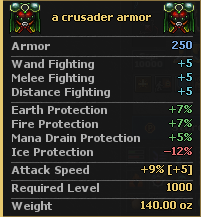
The item tooltip is built into the client. Hover an item and a colored panel appears with its name, count, combat stats, protections, skills, attributes, and description. There is no extra button to open.
How to Use
- Move the mouse over an item in your inventory, a container, or the NPC trade view.
- Wait a moment. The client asks the server for the look text, then fills the tooltip.
- Move the mouse away to hide it.
What It Shows
Lines are grouped and color-coded so you can scan them quickly:
- Header — item name, count, and icon.
- Combat — Attack, Defense, Armor, Range, Volume, and weapon AOE when the item has them.
- Protections — Physical, Energy, Earth, Fire, Ice, Holy, Death, Drown, Poison, Life Drain, and Mana Drain.
- Skills — fighting skill bonuses.
- Health & Mana — extra health or mana.
- Attributes — upgrade attributes and other bonuses. See Upgrade Items.
- Reflect — reflected damage when the item has it.
- Vocation & Description — who can use it and the flavor text.