Bot
Official OxyBot scripts for the OxygenOT client, built on vBot
What Is OxyBot?
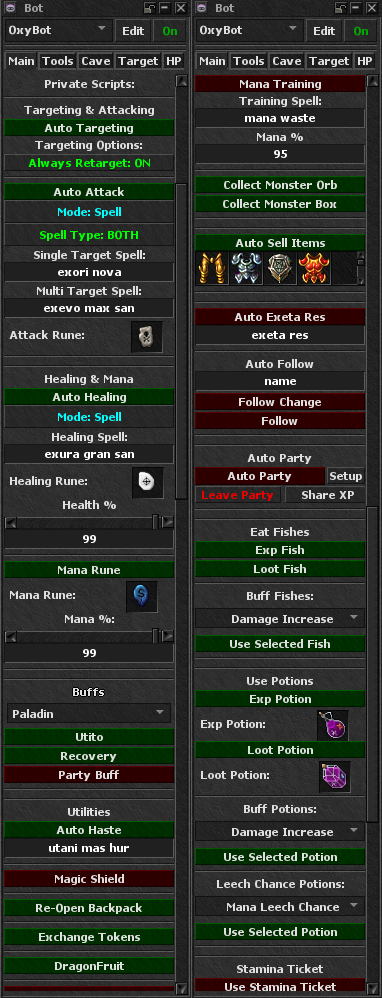
OxyBot is the official OxygenOT bot package. It runs inside the client on vBot and is made for this server. A first-time client install already includes it. Use the Download page when a new OxyBot version is released.
How to Open
- Log in, then click the Bot icon on the icons panel under your equipment on the right.
- Select the OxyBot config from the list if it is not already selected.
- Use the enable button to turn the bot on or off. Tabs in the window group the official scripts.
Install & Update
Skip this if you just installed the client for the first time. To update OxyBot later:
- Close the client.
- Open
%appdata%/OxygenOT/OxygenOT IX_v4/bot - Download the latest package from the Download page.
- Paste the OxyBot folder and overwrite the old one. Do not delete the old folder first if you want to keep your configs.
- Open the client again.
Features
OxyBot groups official scripts into these areas:
- Healing & Mana — keep health and mana up while you hunt.
- Targeting & Attacking — pick monsters and use your combat spells or runes.
- CaveBot & TargetBot — walk hunt routes, loot, and manage supplies.
- Fishing — normal fishing and fishing bosses.
- Utilities — auto follow, auto party, eat fishes, potions, and stamina tickets.
- vBot extras — alarms, containers, equipment helpers, and other quality-of-life tools.
For more scripts and help, join the OxygenOT Discord.
Rules
Using the official bot is allowed for normal hunting. It is not a pass to break the rules.
Using automated scripts, bots, or staying fully AFK while following a party leader on bosses that spawn naturally or on a schedule can lead to jail. Other characters on the same player can be jailed too. Read the game rules.