[16.09.2026] Changelog - Patch 4.0 - Season IX
Additions
New Outfits & Mounts
- Added 4 new outfits.
- Added 3 new mounts.
- More details:
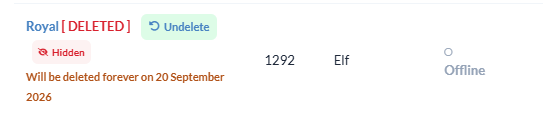
Character Undelete
- Deleted characters can now be restored within 15 days of deletion.
- After the 15-day recovery period expires, the character will be permanently deleted and can no longer be restored.
- As part of introducing this system, all characters that had already been deleted before this update have been permanently removed.
Mail System
- The Mail System is now fully functional.
- You can now send Parcels and Letters to other players.
- To send a Parcel or Letter, simply write the recipient's character name on the top of the label or letter.
- The system will automatically deliver it to the specified player.

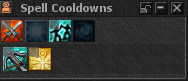
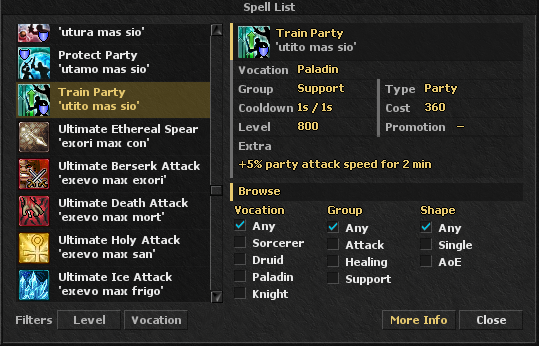
Ingame Spell List
- Added a new Spell List and Cooldown Window directly in the client.
- Updated the !spells command to open the Spell List.
Event Participation Rewards
- Players who are kicked from CTF or Battlefield to balance the teams will now receive 1 Event Point.
- Players who remain inside the CTF, Battlefield, or Zombie waiting room until the event waiting period ends will receive 1 Event Point if the event cannot start due to insufficient participants.
- Players who leave the waiting room early will not receive the point.
- Players who are automatically removed after the waiting period will receive the point.
- More details:
Adjustments & Balancing
Frag System Rework
- Simplified the Frag system by removing the Daily, Weekly, and Monthly Frag limits.
- Frags are now counted as Total Frags only.
- The punishment limits remain unchanged:
- 10 Frags → Red Skull
- 20 Frags → Banishment
- PVP-E Day remains unchanged and continues using its own separate Frag system.
- Updated the !frags command to support the new Frag system.
- More details:
Players Below Protection Level 150
- Changed the PvP protection system for players below level 150.
- Players level 150+ can attack players below level 150 without receiving a Skull, gaining Frags, or receiving PZ Lock.
- PvP Mode must be enabled, but there is no need to disable Safe PvP or change the attack level.
- Players below level 150 cannot attack other players.
- They can still die normally to monsters, including inside town range.
- If another player would kill them, they will instead be teleported back to their temple.
- This protection applies only within the entire town area and does not apply outside town.
- This change was introduced to prevent low-level characters from being used to interfere with or abuse the PvP system.
Target Visibility
- Changed the visibility requirement for targeting players with spells and weapons.
- Players can now only attack or heal another player if both characters can see each other.
- Seeing only the player's name at the edge of the screen is no longer sufficient.
- This mainly affects situations around the northern and southern edges of the screen where a player's name could previously be visible while their character was not.
- No spell, weapon, or attack range has been changed or reduced.
- The change only affects the visibility requirement of the target.
Inspect Visibility
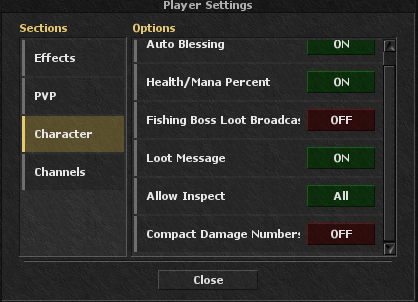
- Added a new Player Settings option to Allow Inspect:
- All — Everyone can inspect you.
- Guild — Only guild members can inspect you.
- Party — Only party members can inspect you.
- OFF — No one can inspect you.
- You still can inspect yourself to check your stats always.
Damage Number Display
- Added a new Player Settings option to change how damage numbers are displayed:
- Normal, k, m, b
- The option is disabled by default.
- The selected format is also applied to the Server Log.

Behemoth Spawn
- Added Vampires to the Behemoth hunting spawn.
Boss Loot Messages
- Added rarity-based colors to Boss Loot messages.
- Rare and valuable loot is now easier to identify.

Website Updates
Market & Character Market
- Added a Show My Offers filter to both the Market and Character Market pages.
- You can now easily view all offers you have listed from your account.


Character Market
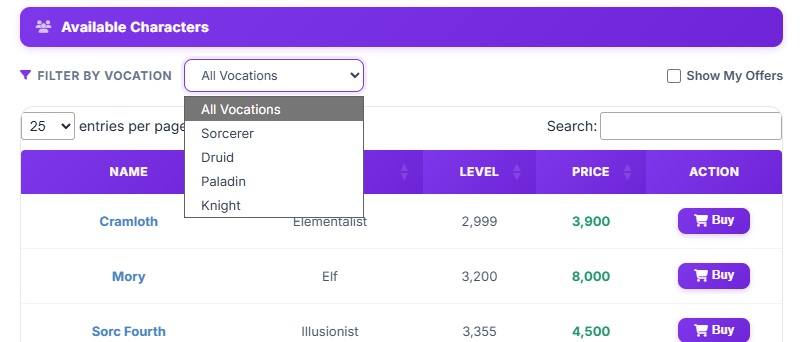
- Fixed an issue with the Vocation Filter.
- Selecting a vocation now displays characters of that vocation, including all of its promotions.
Website
- Fixed several reported issues across the website.
Map & Spawn Updates
Hourly Bosses
- Modified the spawn locations of all hourly bosses.
- Bosses now spawn on a separate floor or behind walls with a door.
- This prevents Cave Bot users in nearby hunting areas from accidentally entering boss areas and triggering an AFK Check.
- Players using Cave Bot should update their waypoints to avoid entering these areas.
- While an hourly boss is alive, you can check its exact spawn location using:
- !exiva BOSSNAME
Map Fixes
- Fixed several reported map issues.
- Fixed an issue that allowed players to Browse Field on house tiles.
- Fixed an issue with the exits of Bragrumol and Arbaziloth that could cause players with White Skull to be sent directly to the temple and lose PZ Lock.
- Players can no longer be pushed while standing on Waypoint Tiles.
Systems & Mechanics
Monster Corpses
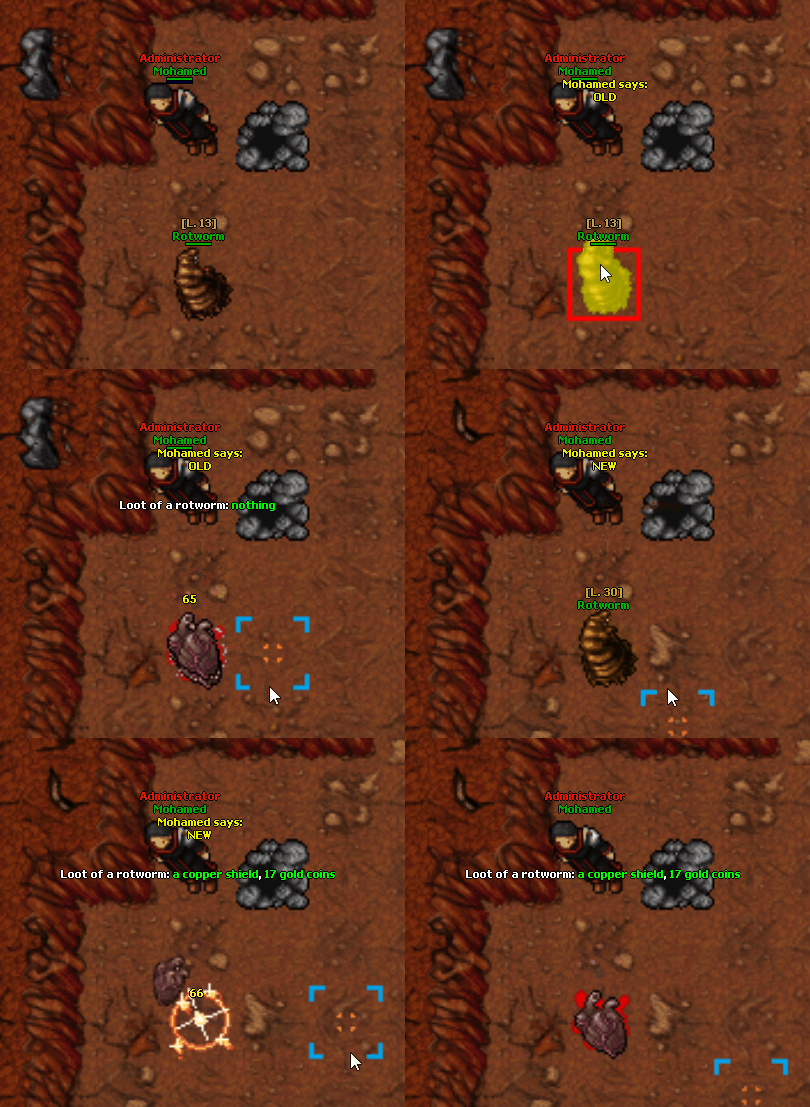
- Optimized monster corpses to work correctly with monster death effects.
Offline Training
- Added an Offline Training Bar to the Skills Window.
- Replaced the previous login message with the new in-game display.

Inventory
- Fixed an issue where the minimized state of the Inventory was not saved correctly.
- The Inventory could previously become bugged after closing and reopening the client.
Fixes
Mobile Client
- Fixed an issue where Health and Mana bars could appear incorrectly on the mobile client.
Boss Corpses
- Fixed an issue where boss corpses would not decay correctly.
Frag System
- Fixed a rare issue where players could fail to receive a Frag and the 5-minute PZ Lock after initiating an attack on another player.
Server Stability
- Fixed several issues that could cause the server to freeze for approximately 2 seconds.
Death & Level Up
- Fixed a very rare issue where a character could survive after reaching 0 HP and 0 Mana due to leveling up.
- Characters will now correctly die when reaching 0 HP and 0 Mana.
Crafting
- Fixed an issue where item tooltips were not displayed correctly in the Craft Window.
Molten Boots
- Fixed the stats of Molten Boots.
Reflect
- Fixed an issue where Reflect stats were displayed on certain items, causing unnecessary and repetitive messages.
Nexus Rune
- Fixed an issue where using the Nexus Rune to reset upgrades also reset upgraded stats instead of only resetting available upgrade slots.
Inspect Window
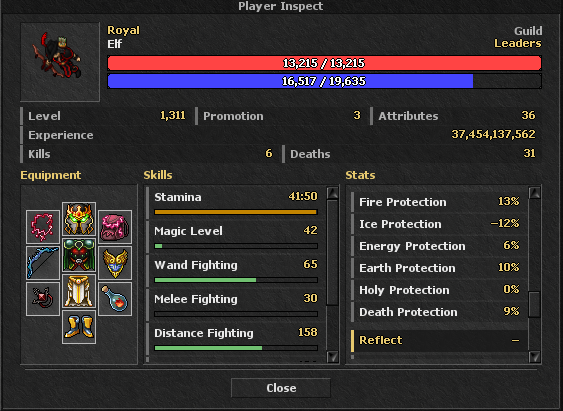
- Improved the Inspect Window to make it more advanced, organized, and informative.
- Added HP/Mana regeneration per second.
- Added Armor.
- Added Defense.
- Added Attack.
- Added Elemental Protection.
- Added Reflect stats.
Client Updates
Client Update 4.1.2
- Released for Windows and Android.
- Added required client-side changes for the latest game updates.
- Added several performance optimizations to improve FPS and reduce CPU usage.
Client Update 4.1.3
- Released for Windows and Android.
- Optimized the Android client for a smoother and more user-friendly experience.
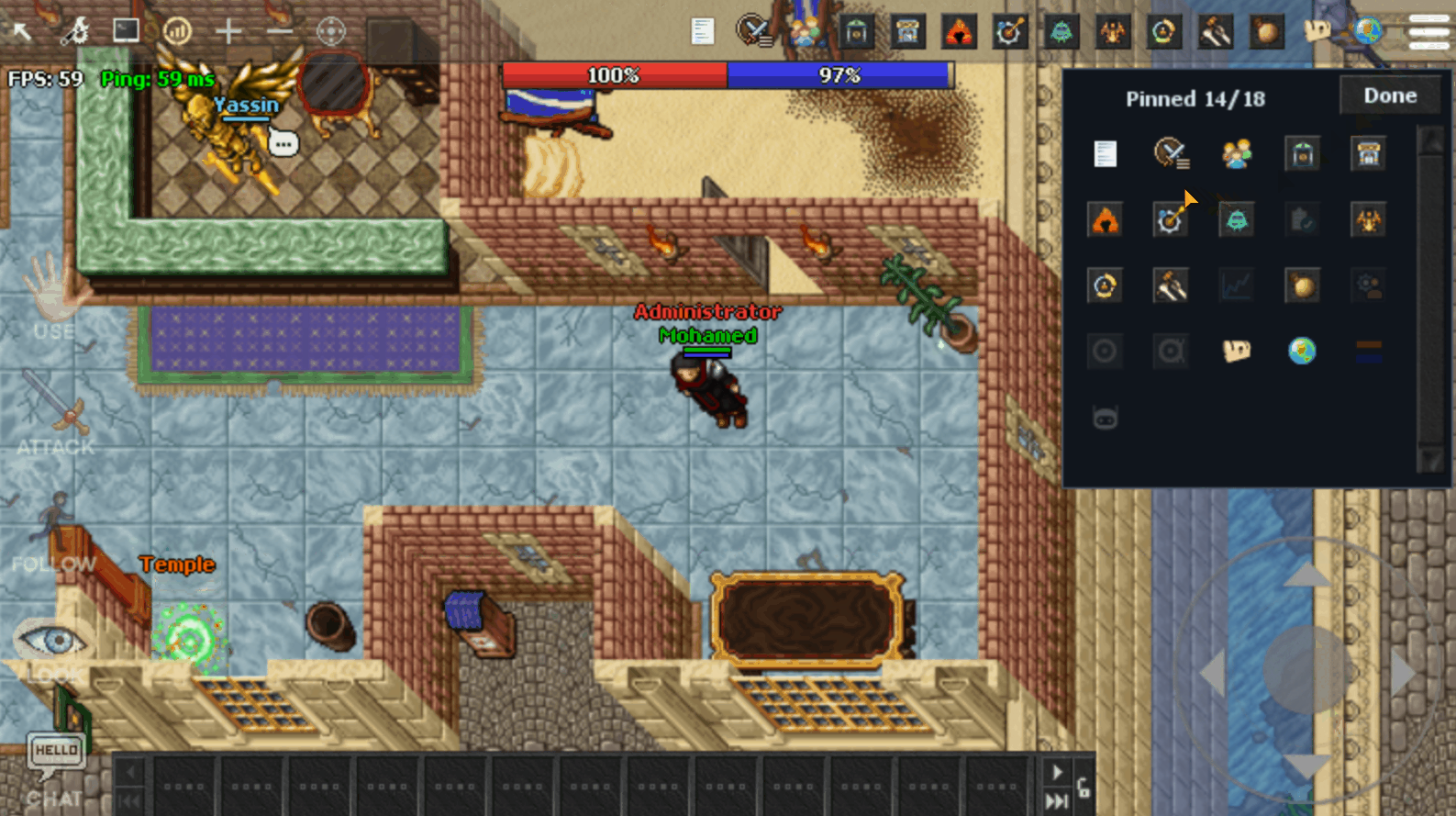
- Added new Top Bar settings to choose which buttons are displayed.
- Improved the Top Bar to prevent icons from overlapping with buttons on the left side.
- Moved FPS and Ping indicators to the top-left corner directly below the Top Bar.
- Improved and optimized the Keypad interface.
Client Update 4.1.4
- Released for Windows and Android.
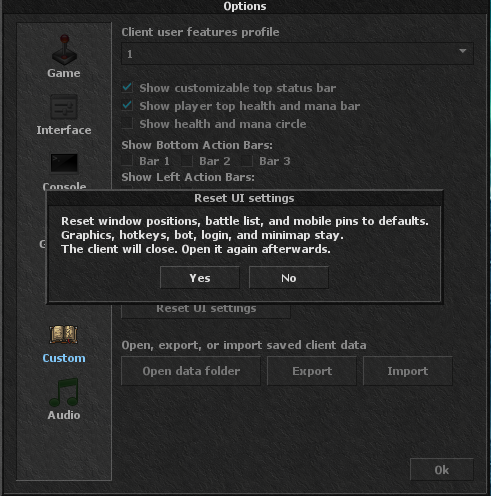
- Added a Reset UI button to the Rest UI settings.
- Fixed an issue with the Battle List.
- Fixed a minor issue with mobile client buttons.
Client Update 4.1.5
- Released for Desktop and Android.
- Improved the Dungeon Window with more detailed information about the dungeon and boss.

Client Update 4.1.6
- Released for Windows and Android.
- Fixed a visual issue affecting Prey timers.
Client Update 4.1.7
- Released for Windows and Android.
- Added the latest Minimap updates reflecting the new hourly boss locations.
Client Update 4.1.8
- Released for Windows and Android.
- Added all required client-side changes for the latest game updates.
- Fixed an issue where condition icons would shrink when hovering over them with the mouse.
Android APK v2.0
- Released Android Client APK v2.0.
- This update was required to log in after the next server save and support the latest client changes.
Client Update 4.1.9
- Released for Windows and Android.
- Added all required client-side changes for the latest game updates.
- The update was recommended to prevent glitches or issues with the Inspect and Player Settings windows.
Client Update 4.2.0
UI Improvements
-
- Added side arrows to make opening panels easier without navigating through Options.
- Improved the appearance of the Options images.
- Fixed several issues with Inspect and item tooltips related to Reflect stats.
- Improved assigning spells to Action Bars.
- Added filters to make it easier to find spells based on level.

Client Data Management
-
- Added new Open Data, Export, and Import options under Options → Custom.
- You can now directly open the client Data folder to edit your configuration files.
- Added the ability to export your client configuration.
- Exported files do not include the client executable, map, or log files.
- The export mainly contains configuration files.
- Added an Import option to restore previously exported configurations.
- This makes it significantly easier to transfer configurations between Desktop and Android clients.

Android Client
-
- Added an update notification for Android users when a new APK version is available.
- Players will now be notified when they need to update their APK.

OxyBot Updates
-
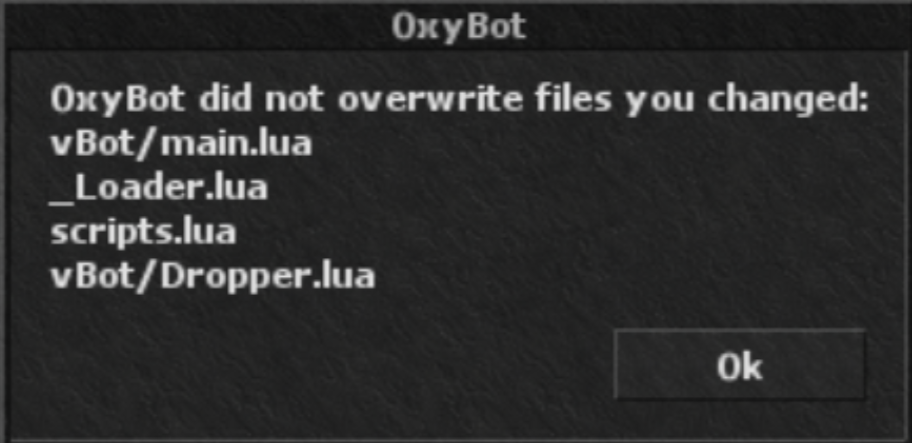
- Improved the client updater to automatically update OxyBot files without overwriting manually edited files.
- The client will notify you when a file could not be updated because it was modified by you.
- To restore the original version of an edited file, simply remove the edited file and allow the client to download the original version.
Client Updater
-
- Improved the updater to automatically retry failed or interrupted downloads.
- If an update fails or the connection is lost, the updater will retry automatically:
- 5 seconds, 10 seconds, 15 seconds and so on up to 60 seconds.
- Once it reaches 60 seconds, it will continue retrying every 60 seconds until the update succeeds or is cancelled.
- This prevents failed updates from requiring players to restart the client and begin the update process again.
Automatic Updates on Global Server Save
-
- The client now checks for updates when the Character List is opened.
- If an update is available after a server save or relog, the client will automatically download and apply it.
- After updating, the client will restart and automatically log back into the same character.
- This allows players who are AFK during a server save to receive client updates automatically without being blocked from returning to the game due to an outdated client.
Outfit Window
-
- Fixed an issue with the Outfit Window when selecting Wings.
- Optimized several Wings that were displayed incorrectly compared to how they appeared in-game.
- Before:

-
- After:

Client Stability
-
-
Fixed several additional issues to improve overall client stability and performance.
-
Android APK Version 2.1
- This update includes the latest Android client changes.
Important Client Update Notes
- Client updates will become available 5 minutes before the next server save.
- Make sure to apply the required updates before attempting to log in after the server save.
- The latest client version will be required to log in after the applicable server save.
Windows Defender
- Some Windows Defender installations may incorrectly detect the updated client executable files as malware.
- This is a false positive caused by the executable files.
- Keeping Windows Defender and Windows fully updated can help prevent these false detections.
- Updated client files will also be available on the website Download page with the next server save.
- If you prefer to download a fresh client, remove data.zip from:
- %appdata%/OxygenOT/OxygenOT IX_v4
- Then start the client normally.
Notes
- Some changes are live and rest will be live with next server save.
- Make sure your client is updated to the required version before the next server save.